How to Build an AI Executive Assistant That Never Forgets with Claude Code
Turn Claude Code into a persistent executive assistant with morning briefings, auto-logging, context-aware reminders, complex skills, and a memory that compounds over time — using only markdown files.

Table of Contents
- The Problem
- The Solution
- How It Works
- The File Structure
- The Steering Document (CLAUDE.md)
- Slash Commands
- Skills: Complex Multi-Step Workflows
- Context-Aware Reminders
- The Hourly Memory Summarizer
- The launchd Agent
- MCP Integrations
- The Feedback Loop
- A Real Session: From Conversation to 4 Published Blog Posts
- What I Learned
- What’s Next
Every AI assistant has the same fundamental flaw: it forgets everything the moment you close the terminal. This guide shows you how to fix that with a file-based memory system that turns Claude Code into a persistent executive assistant.
The Problem
You’re juggling multiple projects, client engagements, and action items. You have a productive 2-hour session with Claude Code — decisions made, action items identified, follow-ups planned. You close the terminal. Next morning, you open Claude Code again.
Blank slate.
The AI has no memory of yesterday’s decisions, last week’s meeting notes, or the follow-up you promised a client by Friday. You end up re-explaining context every single session, losing action items between conversations, and treating AI as a disposable tool instead of a compounding assistant.
The core insight: don’t fight the amnesia — work with it. Write everything to files. Make the AI read them back. Let knowledge compound.
The Solution
A file-based memory system where everything important gets persisted to markdown files. The AI reads them back at every session start. Combined with a Python script that automatically summarizes your conversations, you get an executive assistant that:
- Delivers morning briefings with your calendar, emails, reminders, and blockers
- Tracks action items with flexible triggers (date-based, context-based, blocker-based)
- Auto-logs every session via an hourly summarizer script
- Runs end-of-day wrap-ups and weekly syntheses
- Self-critiques important outputs before showing them to you
- Learns your preferences and never repeats the same mistakes
No custom code at the core — just markdown files and a well-structured steering document. The only code is the optional hourly summarizer.
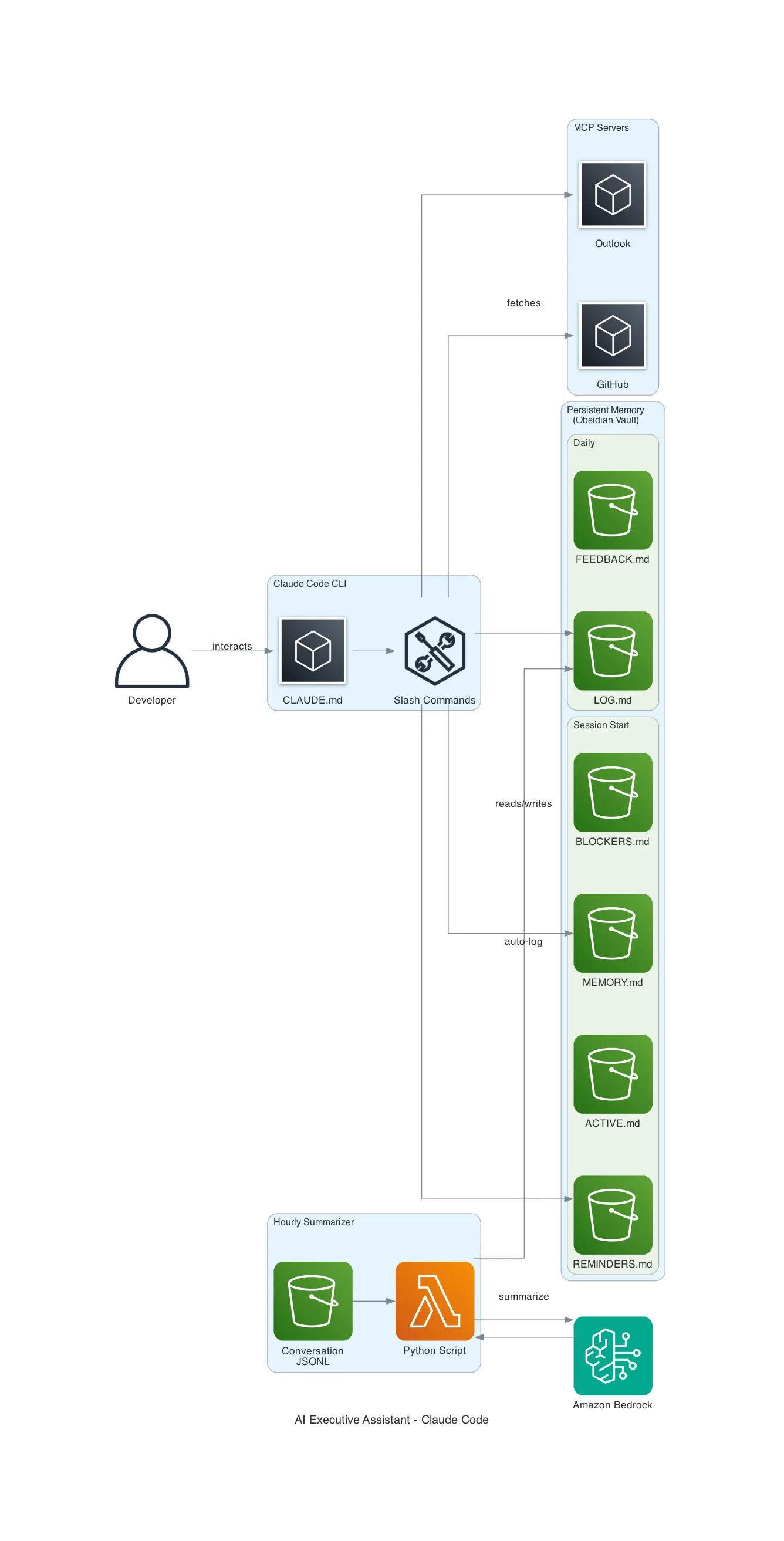
How It Works
The File Structure
Everything lives in a single directory. I use Obsidian for visibility, but any folder works:
exec-assistant/
├── MEMORY.md          # Stable facts: clients, projects, team, preferences
├── ACTIVE.md          # Current focus, weekly goals
├── LOG.md             # Daily progress log (auto-populated by summarizer)
├── REMINDERS.md       # Action items with flexible triggers
├── BLOCKERS.md        # Current impediments
├── BACKLOG.md         # Future work queue
├── FEEDBACK.md        # Preferences learned + mistakes to never repeat
├── DECISIONS.md       # Architecture Decision Records
├── meetings/          # Meeting notes
├── weekly/            # Weekly synthesis files
└── scripts/           # Automation (hourly summarizer)
Each file has a clear purpose. The AI knows which file to check based on context. Mention a project and it reads MEMORY.md; mention a blocker and it checks BLOCKERS.md.
The Steering Document (CLAUDE.md)
Claude Code has a global instructions file at ~/.claude/CLAUDE.md that’s loaded into every conversation. This is the secret sauce — it defines the assistant’s persona and behaviors without any custom code.
Here’s the structure of mine:
# Claude Code — Executive Assistant

You are an AI Executive Assistant for [Your Name].
Beyond coding assistance, you manage daily workflow:
briefings, meeting prep, reminders, and wrap-ups.

## Memory System

| File | Purpose | Read at session start? |
|------|---------|----------------------|
| MEMORY.md | Stable facts | Yes (full) |
| ACTIVE.md | Current focus, weekly goals | Yes (full) |
| REMINDERS.md | Action items with triggers | Yes (full) |
| BLOCKERS.md | Current impediments | Yes (full) |
| FEEDBACK.md | Preferences + mistakes | Yes (full) |
| LOG.md | Daily progress log | Yes (today only) |

## Session Start — Morning Briefing

At the START of every conversation, automatically:
1. Read all session-start files
2. Fetch calendar/email via MCP (if available)
3. Cross-reference: flag items appearing across sources
4. Present structured briefing

## End-of-Day Wrap-Up

When I say "let's wrap up":
1. Review today's LOG.md
2. Check open PRs/issues
3. Ask about new blockers
4. Confirm tomorrow's priorities
5. Update files accordingly
The key sections are:
- Session Start — defines what happens automatically when you open Claude Code
- Memory table — tells the AI exactly which files to read and when
- Proactive behaviors — flag overdue reminders, escalate stale blockers, prompt weekly goal refresh
- Self-critique rule — for important outputs, draft → critique → refine before showing
Slash Commands
Claude Code supports custom commands via markdown files in ~/.claude/commands/. Each file becomes a /command you can invoke:
| Command | What it does |
|---|---|
/briefing | Morning briefing (calendar, email, reminders, blockers) |
/wrapup | End-of-day wrap-up |
/weekly-synthesis | Weekly summary (Monday mornings) |
/remind [desc] | Add a reminder to REMINDERS.md |
/blocker [desc] | Add a blocker to BLOCKERS.md |
/focus [desc] | Update ACTIVE.md focus/goals |
/feedback [desc] | Record a preference or mistake |
Each command file is just markdown with instructions. For example, here’s /remind:
# /remind — Add Reminder

## Arguments
$ARGUMENTS — The reminder description

## Instructions

1. Read REMINDERS.md
2. Determine the next R[NNN] ID
3. Ask the user:
   - When is this due?
   - Is this date-based, context-based, or blocker-based?
4. Add the entry to REMINDERS.md
5. Confirm what was saved
Skills: Complex Multi-Step Workflows
Basic slash commands are useful, but the real power comes from skills — multi-step workflows defined in markdown that orchestrate research, file creation, MCP tool calls, and interactive Q&A.
Here’s what my skills library looks like after a few weeks:
| Skill | What It Does |
|---|---|
/blog-generate | Analyzes current conversation, reads existing posts for style, generates D2 diagrams, writes full blog post matching the author’s voice |
/blog-idea [topic] | Quick-captures a blog idea to IDEAS.md with date |
/blog-draft [title] | Creates templated draft with frontmatter in blog repo |
/blog-publish [title] | Removes draft flag, commits, pushes |
/meeting-prep [client] | Full meeting prep: searches Obsidian for context, finds previous meetings, generates structured prep file with talking points |
/sa-tracker | Tracks SA activities from calendar to SFDC |
/discovery | Live meeting assistant for discovery sessions |
A skill file is just markdown with detailed instructions. The difference from basic commands is complexity and orchestration. Here’s a simplified meeting prep skill:
# /meeting-prep - Operations Meeting Prep

## Instructions

### 1. Ask for Client and Geography
Ask which client and region this meeting covers.

### 2. Ask for Topics
Collect topics one by one until user says "done"

### 3. Research Phase
- Read MEMORY.md for client context
- Search Obsidian meetings/ for related notes
- Fetch relevant documentation via MCP
- Search AWS docs for mentioned services

### 4. Find Previous Meeting
Search meetings/ for the most recent meeting with same client + geo

### 5. Generate Meeting File
Create structured Obsidian note with:
- Attendees, preparation summary, priority matrix
- Per-topic: context, talking points, resources
- Action items from previous meeting
- Follow-up checklist
Say you run /meeting-prep before a call with Acme Corp about their AWS CloudWAN POC. The skill asks for the region (LATAM), then searches your memory for Acme Corp context, finds 3 previous meeting notes in Obsidian, reads the planning doc via MCP, greps AWS documentation for CloudWAN best practices, pulls the previous meeting’s open action items, and generates a complete prep file with 11 attendees, 10 talking points, and a follow-up checklist. Five minutes, one command.
The blog workflow is the best example of skill chaining. A single /blog-generate invocation:
- Analyzes the full conversation for key concepts and analogies
- Reads existing blog posts to match writing style
- Creates a D2 architecture diagram and renders it to SVG
- Writes a 2000+ word article following the blog’s exact structure
- Saves to the blog repo, marks the idea as in-progress in IDEAS.md
In one session, I generated 4 blog posts with diagrams, removed draft flags, committed, and pushed — all through skills.
Context-Aware Reminders
Reminders aren’t just dates. They have three trigger types:
- Date-based: “Remind me by Feb 17” — checked at session start
- Context-based: “When I’m working on platform comparison” — triggers when keywords appear in conversation
- Blocker-based: “When blocker B001 is resolved” — triggers when a specific blocker gets cleared
Here’s what an entry looks like in REMINDERS.md:
### R012: Migration runbook review
**When**: When working on database migration
**Trigger**: Context-based (keywords: migration, RDS, cutover, runbook)
**Action**: Review and finalize the migration runbook before next planning session
**Context**: Client flagged concerns about rollback procedures during last call
**Status**: Open
The steering document tells Claude to check for keyword matches during conversations and surface relevant reminders automatically.
The Hourly Memory Summarizer
This is the automation layer. A Python script runs every hour via macOS launchd and captures everything — even sessions you forget to log manually.
How it works:
- Scans
~/.claude/projects/*/for conversation JSONL files modified in the last hour - Extracts user messages and assistant text responses (skips tool calls, thinking blocks)
- Sends the conversation to Amazon Bedrock for structured summarization
- Writes the summary into LOG.md under the correct date
Claude Code stores full conversation history as JSONL files at:
~/.claude/projects/<project-slug>/<session-uuid>.jsonlEach line is a JSON object with the message type, role, content, timestamp, and tool usage. The script parses these to reconstruct conversations.
Here’s the core logic:
CLAUDE_PROJECTS_DIR = Path.home() / ".claude" / "projects"

def find_recent_sessions(lookback_hours=1):
    cutoff = datetime.now().timestamp() - (lookback_hours * 3600)
    sessions = []
    for project_dir in CLAUDE_PROJECTS_DIR.iterdir():
        if not project_dir.is_dir():
            continue
        for jsonl_file in project_dir.glob("*.jsonl"):
            if jsonl_file.stat().st_mtime > cutoff:
                sessions.append({
                    "path": jsonl_file,
                    "project_slug": project_dir.name,
                    "modified": jsonl_file.stat().st_mtime,
                })
    return sessions

def extract_messages(jsonl_path):
    messages = []
    with open(jsonl_path, "r") as f:
        for line in f:
            entry = json.loads(line.strip())
            if entry.get("type") == "user":
                content = entry["message"]["content"]
                if isinstance(content, str):
                    messages.append({"role": "user", "text": content[:2000]})
            elif entry.get("type") == "assistant":
                for block in entry["message"].get("content", []):
                    if block.get("type") == "text":
                        messages.append({"role": "assistant", "text": block["text"][:2000]})
    return messages
The script uses a checkpoint file to avoid re-processing sessions. Each run only processes conversations that have been modified since the last checkpoint.
The result in LOG.md looks like this:
## 2026-02-13

#### Auto-Summary 13:05 — Client Architecture Review
**Topics:**
- SFTP modernization architecture with AWS Transfer Family
- VPC endpoint design for multi-account landing zone

**Decisions:** Chose NLB over GWLB for SFTP ingress

**Action Items:**
- Update architecture diagrams for VPC endpoints approach

**Key Outcomes:**
Created meeting prep with three architecture diagrams.
The launchd Agent
On macOS, a launchd plist runs the script every hour:
<?xml version="1.0" encoding="UTF-8"?>
<plist version="1.0">
<dict>
    <key>Label</key>
    <string>com.user.claude-memory-summarizer</string>
    <key>ProgramArguments</key>
    <array>
        <string>/opt/homebrew/bin/python3</string>
        <string>/path/to/scripts/hourly_memory_summarizer.py</string>
    </array>
    <key>StartInterval</key>
    <integer>3600</integer>
    <key>RunAtLoad</key>
    <true/>
</dict>
</plist>
Activate it with:
launchctl load ~/Library/LaunchAgents/com.user.claude-memory-summarizer.plistOn Linux, a cron job achieves the same thing:
0 * * * * /usr/bin/python3 /path/to/hourly_memory_summarizer.pyMCP Integrations
Claude Code supports MCP (Model Context Protocol) servers — plugins that give the AI access to external services. The executive assistant becomes dramatically more capable with each MCP server you add:
| MCP Server | What It Enables |
|---|---|
| Outlook MCP | Calendar events, unread emails, meeting scheduling for morning briefings |
| Playwright MCP | Browser automation — fetch JavaScript-rendered pages, take screenshots, navigate web apps |
| AWS MCP | Search AWS documentation, call AWS APIs, check regional availability |
| Builder MCP | Read/edit Quip documents, search internal wikis, manage tasks |
| Diagram MCP | Generate architecture diagrams programmatically |
| Slack MCP | Unread DMs and mentions |
In practice, a single meeting prep skill might chain 4 MCP servers: read a planning doc (Builder MCP), search AWS documentation for relevant best practices (AWS MCP), fetch a workshop page via browser (Playwright MCP), and check the participant’s calendar (Outlook MCP).
Add them to ~/.claude.json:
{
  "mcpServers": {
    "aws-outlook-mcp": {
      "type": "stdio",
      "command": "aws-outlook-mcp"
    },
    "playwright": {
      "type": "stdio",
      "command": "npx",
      "args": ["@anthropic/mcp-playwright"]
    },
    "aws-mcp": {
      "type": "stdio",
      "command": "aws-mcp"
    }
  }
}
The steering document handles graceful degradation — if an MCP server isn’t available, the skill adapts. Morning briefings still work with local files only; meeting prep skips the Quip fetch and uses Obsidian notes instead.
The Feedback Loop
FEEDBACK.md tracks what works and what doesn’t:
## Preferences Learned

| Category | Preference |
|----------|-----------|
| Questions | Ask one by one, never batch |
| Communication | Concise bullet points |
| IaC | CDK (Python) |

## Mistakes (Never Repeat)

| Date | Mistake | Correction |
|------|---------|------------|
| Feb 10 | Generated diagram without reading docs | Always read reference docs first |
The assistant reads this at every session start. It adapts to your preferences over time and doesn’t repeat mistakes.
A Real Session: From Conversation to 4 Published Blog Posts
Here’s what a typical session looks like after the system is running. This actually happened:
9:00 AM  — Open Claude Code
           → Auto-briefing: calendar, emails, reminders, blockers
           → Flags: "CloudWAN workshop today at 2pm"

9:05 AM  — /meeting-prep
           → Asks: "Which client and region?"
           → Searches 4 memory files, 10+ meeting notes
           → Fetches planning doc via MCP
           → Generates full meeting prep with talking points

9:20 AM  — "Explain MPLS vs SD-WAN simply"
           → Gives clear explanation with analogies
           → "That could be a nice blog article, right?"

9:22 AM  — /blog-idea MPLS vs SD-WAN vs CloudWAN
           → Saved to IDEAS.md

9:23 AM  — /blog-generate
           → Reads existing posts for style
           → Creates D2 architecture diagram
           → Writes 2000-word article
           → Commits and pushes to blog repo

9:35 AM  — /blog-generate LLM Inference Demystified
           → Another full article from interview prep notes in memory
           → D2 diagram of inference pipeline
           → Committed and pushed

9:50 AM  — /blog-generate LLM Architecture From Prompt to Token
           → Third article, complements existing Transformer post
           → D2 diagram of full pipeline
           → Committed and pushed

10:00 AM — "How many articles in draft?" → 3
           "Remove draft and commit" → Done
           "Push" → Pushed

Total: 1 meeting prep + 4 blog posts + 4 diagrams in ~60 minutes
The assistant seamlessly transitions between meeting prep and content creation, using memory files, MCP tools, and skills interchangeably. Each action builds on the previous one — the MPLS explanation became a blog idea, which became a full article, which got committed and published.
What I Learned
-
Files beat databases for AI memory. Markdown files are human-readable, editable in any text editor, searchable in Obsidian, and version-controllable with git. No schema migrations, no queries, no infrastructure. The AI reads and writes them natively.
-
Steering documents are surprisingly powerful. A well-structured CLAUDE.md file transforms Claude Code’s behavior completely. No custom code, no fine-tuning. Just clear instructions in markdown. The morning briefing, wrap-up workflow, and self-critique rule are all defined in a single file.
-
Auto-logging eliminates the biggest failure mode. The hourly summarizer captures everything, even sessions you forget about. Without it, the system depends entirely on manual
/logentries. With it, LOG.md stays populated automatically and the weekly synthesis has real data to work with. -
Skills are the multiplier. Basic commands (
/remind,/log) are useful but incremental. Complex skills (/meeting-prep,/blog-generate) are transformative — they turn a 30-minute manual task into a 5-minute automated workflow. The key insight: skills can chain multiple MCP servers, search across files, ask clarifying questions, and produce complete deliverables. Once you build a skill, every future invocation is nearly free. -
MCP servers compound with each other. One MCP server is a convenience. Five MCP servers working together in a single skill — Outlook for calendar, document editors for planning docs, AWS MCP for documentation, Playwright for web pages, Diagram MCP for visuals — create capabilities that no single tool provides. The assistant becomes a genuine workflow orchestrator.
What’s Next
- Add a self-assessment pipeline — analyze session data to evaluate system performance (tool usage patterns, reminder completion rates, blocker aging)
- Build a weekly email digest — automatically generate and send a summary of the week’s activity via Outlook MCP
- Experiment with semantic search over memory files — index everything with embeddings for “what did we decide about X last month?” queries
- Create client-specific skill templates — build a reusable meeting prep pattern that any SA can adapt for their accounts
- Add voice input via Whisper — dictate meeting notes that auto-populate Obsidian files
- Build a skill marketplace — share and discover skills across the team
Related Posts
The RISEN Framework: Writing System Prompts That Actually Work for AI Agents
A 5-component framework for writing effective system prompts for any AI agent — Bedrock Agents, Claude Code, LangChain, Strands, or custom builds. With a practical Claude Code implementation.
AITFLOPS: The GPU Metric Every AI Engineer Should Understand
What TFLOPS actually measures, why FP16 matters for LLMs, and why the most important GPU bottleneck for inference isn't compute at all.
AIA $13.5K Open-Source Humanoid Robot: Inside Unitree G1's AI Stack
Unitree ships a humanoid robot with 43 degrees of freedom, a full AI training pipeline on GitHub, and Apple Vision Pro teleoperation — for $13.5K. Here's what the developer ecosystem looks like.