OpenClaw vs NanoBot vs PicoClaw vs TinyClaw: Four Approaches to Self-Hosted AI Assistants
A deep architectural comparison of four open-source frameworks that turn messaging apps into AI assistant interfaces — from a 349-file TypeScript monolith to a 10MB Go binary that runs on a $10 board.

Table of Contents
Four open-source projects solve the same problem — connecting chat platforms to LLM APIs — with radically different architectures. This post breaks down how each one works, what trade-offs they make, and where they fit. Update (March 2026): AWS just announced Amazon Lightsail support for OpenClaw — a one-click managed deployment that eliminates the self-hosting complexity entirely.
The Problem
You want an always-on AI assistant in your messaging apps. Not a web UI you have to visit. Not a SaaS product that holds your data. An assistant that lives where you already communicate — Telegram, Discord, Slack, WhatsApp — and that you fully control.
The requirements seem simple: receive a message from a chat platform, send it to an LLM, return the response. But the moment you start building, the complexity explodes. You need platform adapters (each messaging API is different), provider abstraction (what if you switch from OpenAI to Anthropic?), tool execution (the LLM needs to do things, not just talk), memory (conversations span sessions), security (the LLM is running shell commands on your machine), and deployment (this thing needs to run 24/7 somewhere).
Four open-source communities have tackled this independently. They share the same core pattern — a gateway that bridges messaging platforms to LLM APIs — but their architectures diverge dramatically based on the priorities of their creators. One optimizes for platform coverage and features. One optimizes for provider universality. One optimizes for binary size and hardware deployment. One optimizes for multi-agent orchestration through the filesystem.
None of them run a local model. They are all gateways to external LLM APIs. The AI runs in the cloud; the gateway runs on your hardware.
The Solution
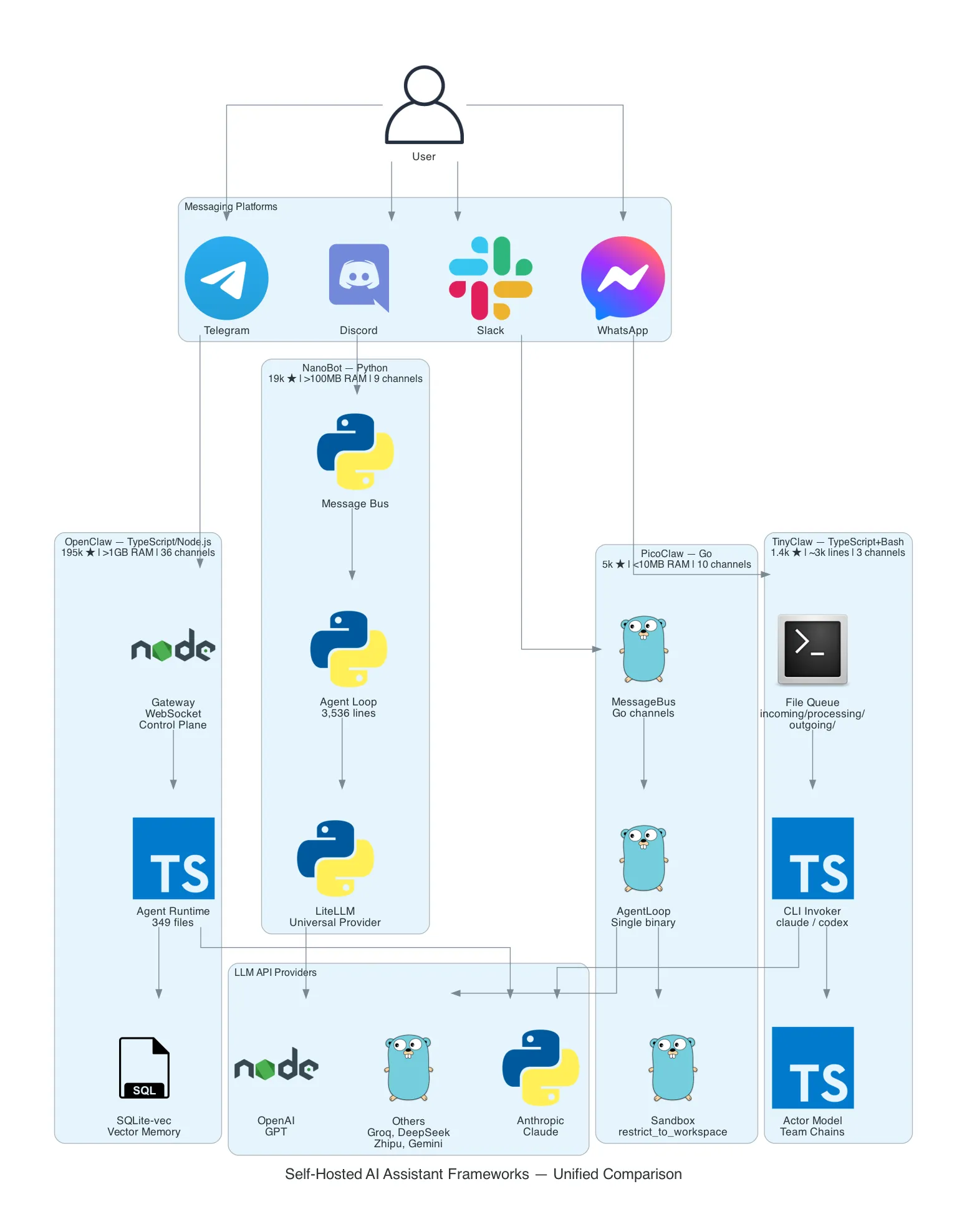
| OpenClaw | NanoBot | PicoClaw | TinyClaw | |
|---|---|---|---|---|
| Language | TypeScript/Node.js | Python 3.11+ | Go | TypeScript + Bash |
| Codebase | 349 files, large monolith | 3,536 lines | ~8,000 lines | ~3,000 lines |
| RAM | >1 GB | >100 MB | <10 MB | ~200 MB |
| Platforms | 36 | 9 | 10 | 3 |
| LLM Providers | 5 (native) | 100+ (via LiteLLM) | 4 (native) | 2 (via CLI) |
| Stars | ~195K | ~19K | ~5K | ~1.4K |
| License | MIT | MIT | MIT | MIT |
| Origin | Community project | HKUDS (University) | Sipeed (Hardware) | Independent developer |
| Key Pattern | WebSocket control plane | LiteLLM universal adapter | MessageBus + Go channels | File-based queue + CLI-as-API |
| Min Hardware | Mac Mini (~$599) | Raspberry Pi 4 (~$50) | Sipeed board (~$10) | Any machine with Node.js |
The cost difference isn’t the LLM API — that’s the same for all four. It’s the hardware required to run the gateway itself. Node.js needs >1 GB of RAM just for the runtime. Python needs >100 MB. Go compiles to a static binary under 10 MB. TinyClaw needs Node.js but its architecture is intentionally minimal.
How It Works
OpenClaw — The Feature Maximalist
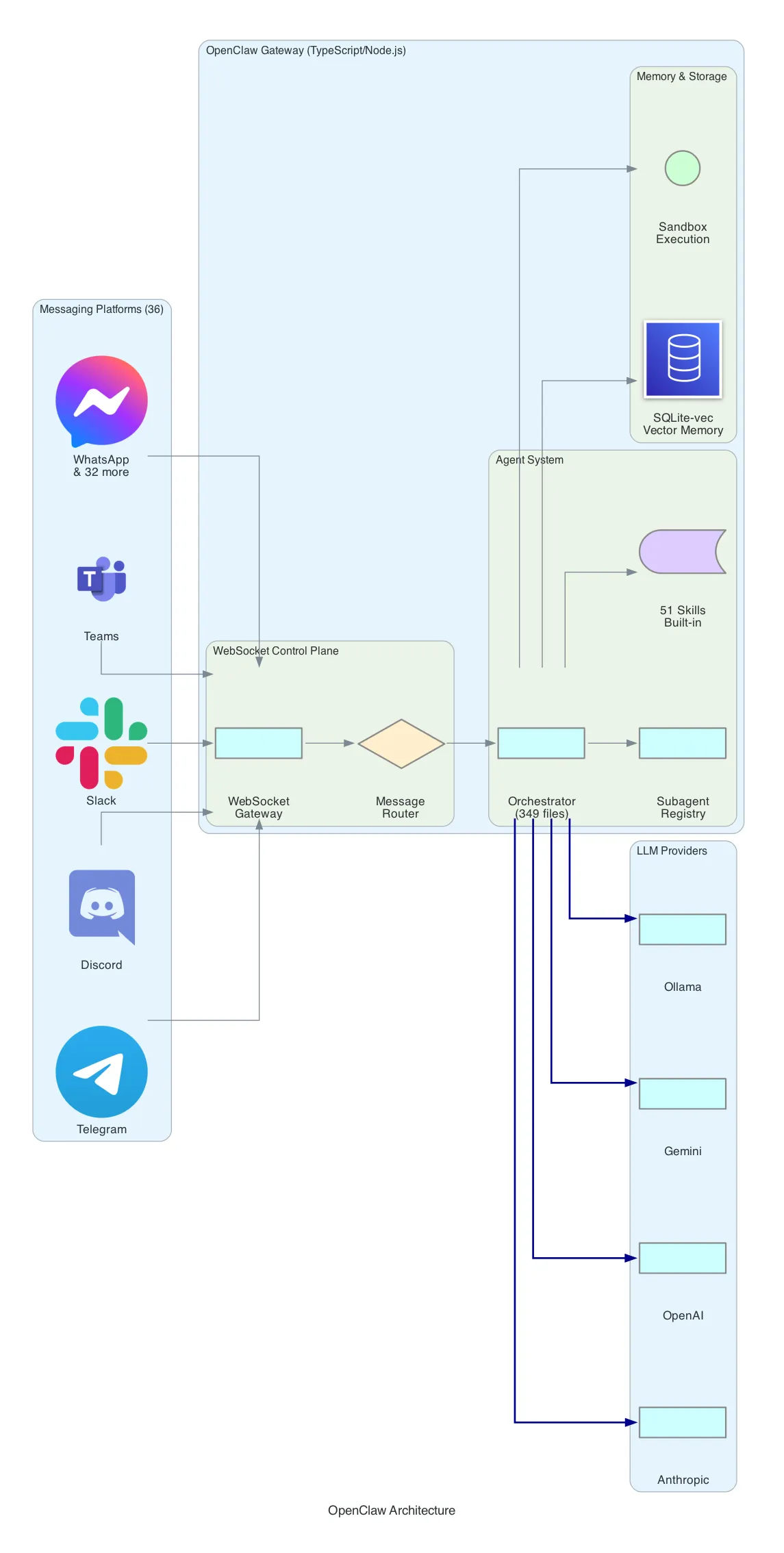
OpenClaw is the oldest and largest of the four. With ~195K GitHub stars and a 349-file codebase, it’s a full-featured AI assistant platform that prioritizes platform coverage and built-in capabilities.
Architecture: OpenClaw uses a WebSocket-based control plane. Messages arrive from any of 36 supported platforms (Telegram, Discord, Slack, WhatsApp, Teams, WeChat, LINE, and 29 others), pass through a message router, and reach the orchestrator — the central brain that manages conversations, tool execution, and multi-agent coordination.
Agent System: The orchestrator maintains a subagent registry. You can define specialized agents (a “coder” agent, a “researcher” agent) and the orchestrator delegates tasks to them. Each agent has access to a subset of the 51 built-in skills — from web search and image generation to calendar management and file operations.
Memory: OpenClaw uses SQLite-vec for vector-based memory. Conversations are embedded and stored locally. The assistant can recall previous interactions semantically — “what did we discuss about the migration last week?” — without sending your entire history to the LLM on every request.
Security: Tool execution happens inside a sandbox. The LLM can run code, but within defined boundaries. File system access, network calls, and shell commands are mediated through the sandbox layer.
Provider Support: Native adapters for Anthropic, OpenAI, Google Gemini, GitHub Copilot, and Ollama (local models). No universal adapter — each provider has its own implementation.
// OpenClaw skill registration pattern
export default {
  name: "web_search",
  description: "Search the web for information",
  parameters: {
    query: { type: "string", required: true }
  },
  async execute({ query }) {
    const results = await searchProvider.search(query);
    return formatResults(results);
  }
};Deployment: Requires Node.js 18+. The npm install pulls hundreds of dependencies. Runs as a long-lived process, typically on a server or desktop machine. CalVer releases ship every 1-3 days — this is actively maintained software with rapid iteration.
Trade-off: Maximum features and platform coverage at the cost of resource requirements and complexity. If you want WhatsApp support, vector memory, and 51 built-in skills out of the box, OpenClaw is the only option. If you want something you can understand by reading the source in an afternoon, look elsewhere.
OpenClaw on Lightsail — The Managed Path
As of March 2026, you no longer have to self-host OpenClaw. AWS announced Amazon Lightsail support for OpenClaw — a managed deployment that bundles everything described above into a one-click experience.

What Lightsail handles for you:
| Self-hosted OpenClaw | Lightsail OpenClaw |
|---|---|
| Manual Node.js setup | Pre-configured instance |
| DIY TLS certificates | One-click HTTPS — no manual TLS configuration |
| Roll your own auth | Device pairing authentication built-in |
| Manual backups | Automatic snapshots for config backup |
| Security hardening | Sandboxed agent sessions out of the box |
| BYO LLM provider config | Amazon Bedrock as default provider |
Bedrock integration is the key differentiator. Instead of managing API keys for external providers, the Lightsail OpenClaw instance connects to Bedrock natively. For organizations already running workloads on AWS, this means no new vendor relationships, no API keys leaving the account, and billing through the existing AWS invoice. You can still swap to other providers if needed — the model flexibility from the open-source version is preserved.
Security posture gets a significant upgrade. Each agent session runs in an isolated sandbox. Combined with device pairing authentication — where only pre-authorized devices can connect — and automatic HTTPS, this addresses the security concerns I flagged in the original comparison. You don’t need to harden OpenClaw yourself anymore.
Availability: 15 AWS Regions including US East (N. Virginia), US West (Oregon), Europe (Frankfurt), Europe (London), Asia Pacific (Tokyo), and Asia Pacific (Jakarta).
Platform support remains the same: Slack, Telegram, WhatsApp, and Discord — the four platforms that cover most use cases.
The trade-off shifts. Self-hosted OpenClaw’s cost was the hardware (Mac Mini at ~$599). Lightsail pricing is consumption-based — likely cheaper for getting started, potentially more expensive at scale depending on the instance plan. But the operational cost drops to near-zero: no OS updates, no Node.js version management, no TLS renewal, no backup scripts.
For enterprise teams, this changes the recommendation significantly. OpenClaw was previously the “feature maximalist with high ops burden” option. Now it’s the “feature maximalist with zero ops burden” option — if you’re on AWS.
NanoBot — The Provider Universalist
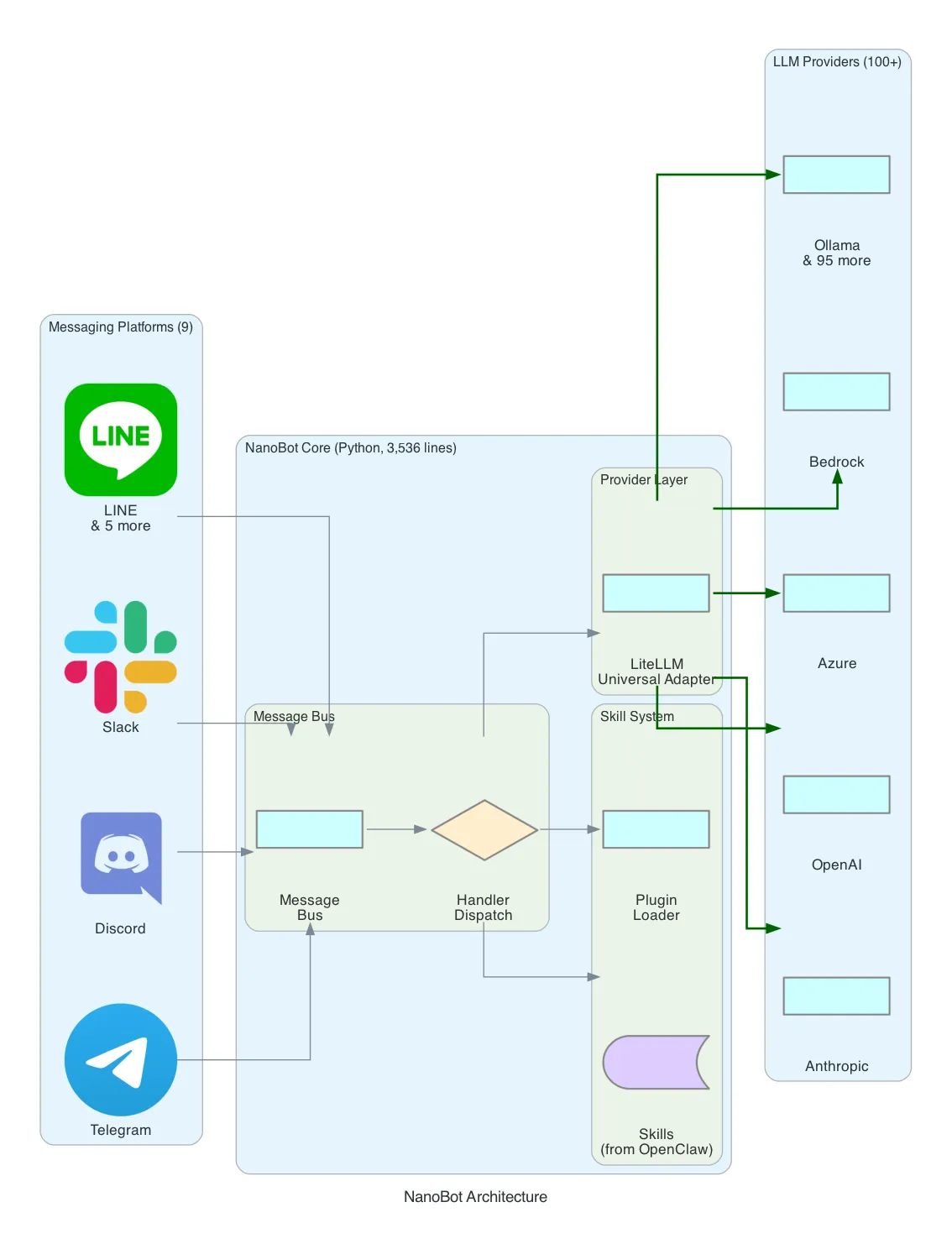
NanoBot was born at the Hong Kong University of Data Science (HKUDS) as a research project. The premise: what if you took OpenClaw’s skill system but made it 99% smaller, wrote it in Python, and added support for every LLM provider on the market?
Architecture: NanoBot uses a message bus pattern similar to OpenClaw’s, but implemented in 3,536 lines of Python instead of 349 files of TypeScript. Messages flow through a handler dispatch layer that routes to skills or directly to the LLM provider.
The LiteLLM Bet: NanoBot’s defining architectural choice is LiteLLM as its universal provider adapter. LiteLLM wraps 100+ LLM providers — OpenAI, Anthropic, Azure, AWS Bedrock, Google Vertex, Cohere, Replicate, Ollama, and dozens more — behind a single interface. You change one configuration line to switch providers:
# Switch from OpenAI to AWS Bedrock — one config change
provider:
  model: "bedrock/anthropic.claude-3-sonnet-20240229-v1:0"
  # was: model: "gpt-4"
This is significant for enterprise contexts. Organizations with existing AWS Bedrock contracts or Azure OpenAI deployments can plug NanoBot into their infrastructure without custom provider code.
Skill System: NanoBot adapts OpenClaw’s skill architecture. Skills are Python modules with a standard interface — name, description, parameters, execute function. The skill ecosystem is smaller than OpenClaw’s but growing, and Python’s package ecosystem (PyPI) makes it straightforward to add capabilities.
Platform Support: 9 messaging platforms — Telegram, Discord, Slack, LINE, and 5 others. Fewer than OpenClaw’s 36, but covering the most common use cases.
Deployment: pip install nanobot and a YAML config file. That’s it. Python 3.11+ required. The entire framework is installable from PyPI, which means updates are a single pip install --upgrade command.
# NanoBot minimal config
channels:
  telegram:
    token: "BOT_TOKEN"

provider:
  model: "claude-3-sonnet-20240229"
  api_key: "sk-..."

skills:
  - web_search
- file_managerTrade-off: Universal provider support and Python ecosystem access at the cost of a larger runtime footprint than Go and fewer messaging platforms than OpenClaw. NanoBot is the best fit for teams already working in Python who want to experiment with multiple LLM providers without rewriting adapter code.
PicoClaw — The Minimalist Edge Runner
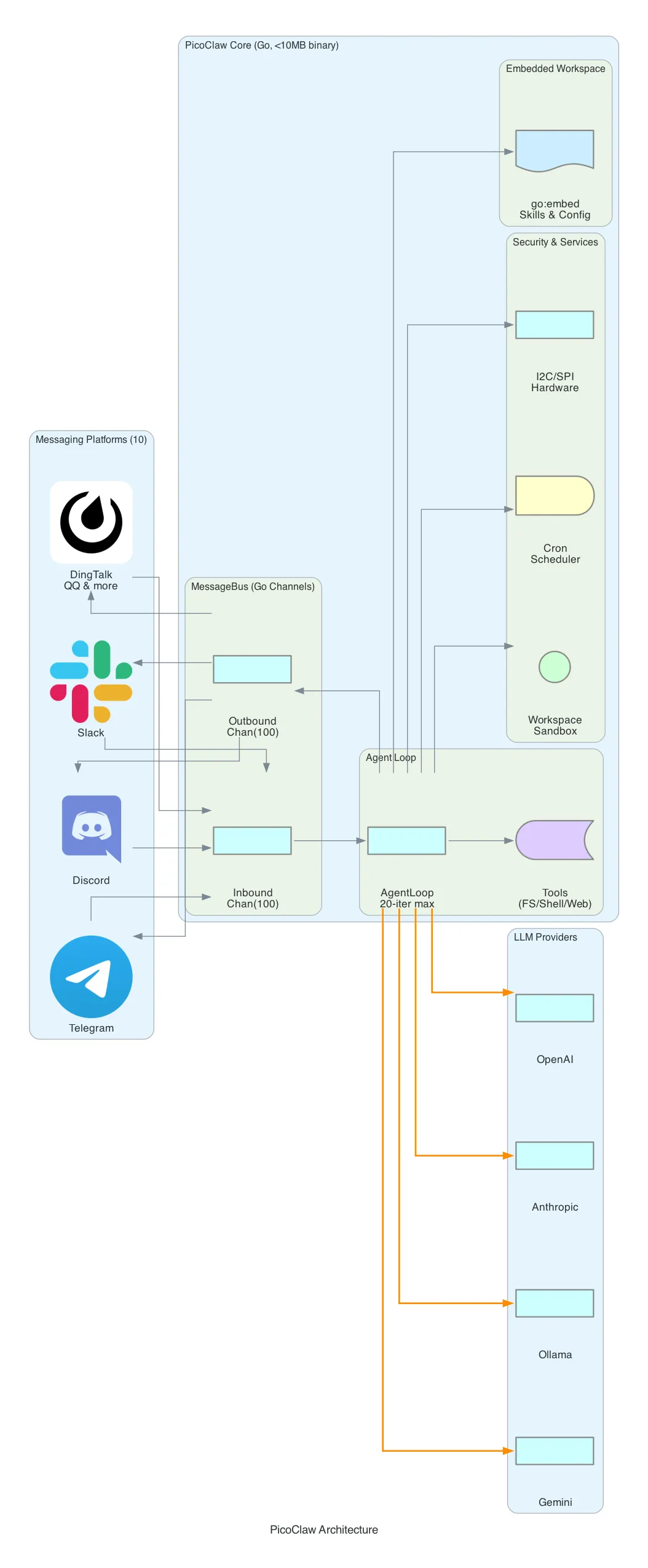
PicoClaw comes from Sipeed, a Chinese hardware company known for RISC-V development boards. That origin explains everything about its architecture: PicoClaw is designed to run on hardware that costs $10.
Architecture: The core is a MessageBus built on Go’s buffered channels with a capacity of 100 messages. Inbound messages from channels (messaging platforms) are placed on the inbound channel. The AgentLoop reads from the inbound channel, processes the message through the LLM with up to 20 tool-call iterations, and places the response on the outbound channel. A dispatcher goroutine reads outbound messages and routes them to the correct platform.
// PicoClaw's MessageBus — the entire routing layer
type MessageBus struct {
    Inbound  chan Message  // capacity: 100
    Outbound chan Message  // capacity: 100
}
This is Go concurrency at its most idiomatic. No WebSocket control plane, no message broker, no external dependencies. Just goroutines and channels.
Single Binary Deployment: PicoClaw uses Go’s //go:embed directive to embed the entire workspace — skills, configuration, templates — inside the compiled binary. The result is a single static executable under 10 MB that you copy to any machine and run. No runtime. No package manager. No dependencies.
//go:embed workspace
var embeddedWorkspace embed.FS
Security Sandbox: The restrict_to_workspace flag confines all file operations to a designated workspace directory. The validatePath() function resolves symlinks, checks for path traversal (../), and blocks any access outside the workspace. Shell commands pass through guardCommand() which applies deny-pattern matching against a configurable blocklist.
// Path validation — resolves symlinks, blocks traversal
func (t *FileSystemTool) validatePath(requestedPath string) (string, error) {
    absPath, _ := filepath.Abs(requestedPath)
    realPath, _ := filepath.EvalSymlinks(absPath)
    if !strings.HasPrefix(realPath, t.workspaceRoot) {
        return "", fmt.Errorf("access denied: path outside workspace")
    }
    return realPath, nil
}
Hardware Tools: Unique among the four, PicoClaw includes I2C and SPI tools for direct hardware communication. These are Linux-only (gated behind build tags) and designed for IoT scenarios — reading sensors, controlling actuators, communicating with peripherals. This is where Sipeed’s hardware DNA shows.
Cron Scheduler: A built-in cron service with crypto/rand IDs and 1-second polling. Supports three schedule types: at (one-time), every (interval), and cron (standard cron expressions). The LLM can schedule its own future tasks.
Platform Support: 10 messaging platforms, with emphasis on Asia-centric apps — DingTalk, QQ, and WeChat alongside the usual Telegram, Discord, and Slack.
Trade-off: Minimal resource usage and single-binary deployment at the cost of fewer built-in skills and a smaller community. PicoClaw is purpose-built for edge deployment — think a Raspberry Pi running an AI assistant for a small team, or a RISC-V board controlling hardware while responding to Telegram messages.
TinyClaw — The Filesystem Orchestrator
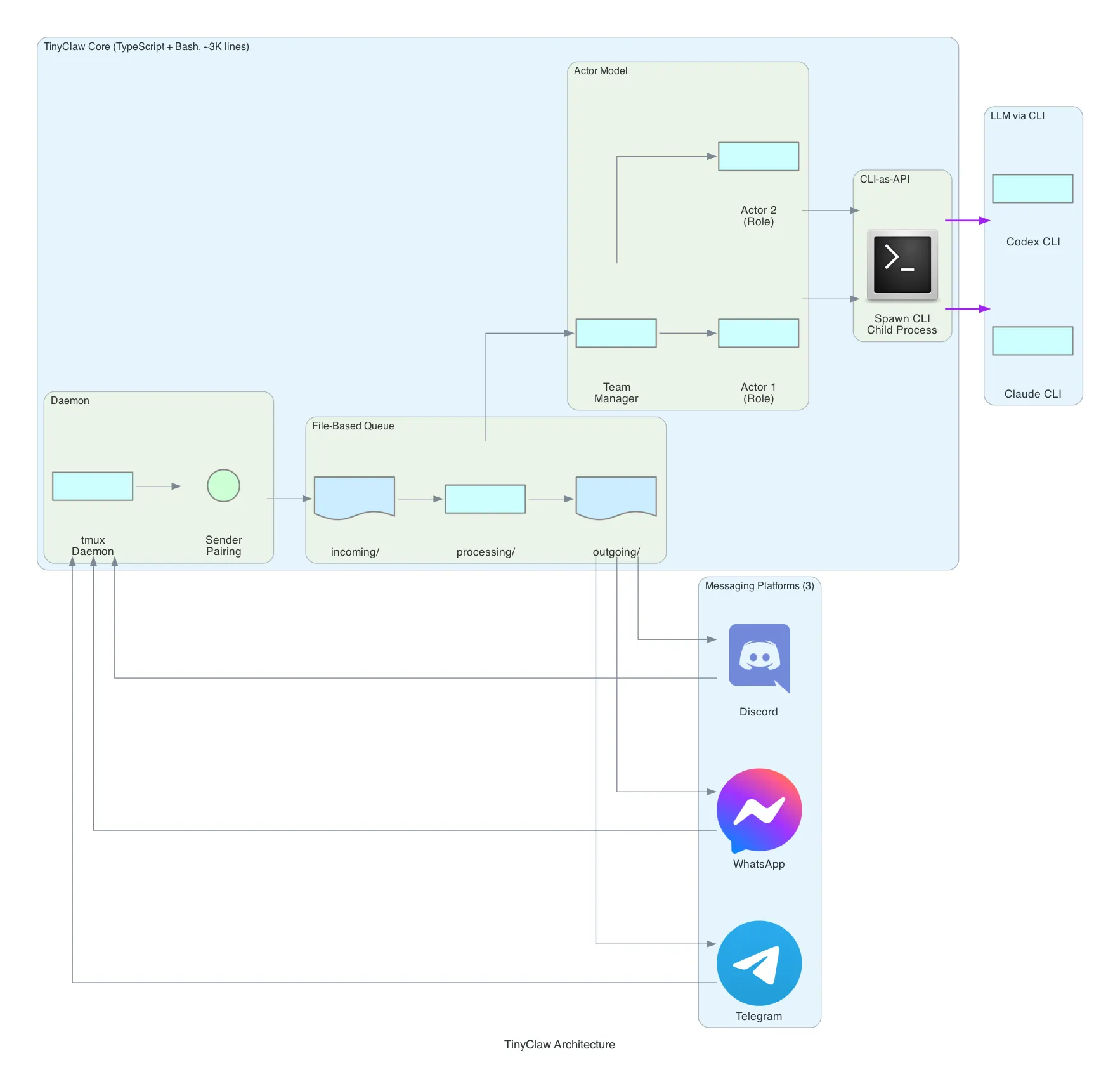
TinyClaw takes the most unconventional approach of the four. Instead of implementing LLM provider SDKs, it spawns existing CLI tools — claude (Anthropic’s Claude Code CLI) and codex (OpenAI’s Codex CLI) — as child processes. The LLM is accessed through the CLI, not through an API.
Architecture: TinyClaw uses a file-based queue instead of in-memory message passing. Three directories form the pipeline:
incoming/    → Messages arrive here as files
processing/  → Messages being handled
outgoing/    → Responses ready for delivery
Messages are literally files on disk. A watcher picks up new files from incoming/, moves them to processing/, sends them through the agent system, and writes responses to outgoing/. This is message queuing implemented with mkdir and mv.
CLI-as-API Pattern: This is TinyClaw’s most distinctive architectural choice. Instead of importing an SDK and making HTTP calls to LLM providers, TinyClaw spawns claude or codex as a child process:
// TinyClaw spawns CLI tools instead of calling APIs
const child = spawn('claude', ['--message', userMessage], {
  cwd: workspaceDir,
  env: { ...process.env, CLAUDE_API_KEY: config.apiKey }
});
The implication: TinyClaw inherits all the capabilities of the CLI tool it wraps — tool use, file editing, code execution, conversation context — without implementing any of it. When Claude Code gains a new feature, TinyClaw gets it for free.
Actor Model: TinyClaw supports multi-agent teams through an actor model. You define actors with roles (e.g., “researcher”, “coder”, “reviewer”), and a team manager coordinates task delegation. Each actor is an independent process with its own CLI session. Actors communicate through the filesystem — one actor’s output file becomes another actor’s input.
Sender Pairing: To prevent unauthorized access, TinyClaw uses a crypto-code pairing system. A new user must present a one-time code to link their messaging identity to an authorized sender profile. No database — the pairing is stored as a file.
tmux Daemon: TinyClaw runs as a tmux session. tmux new-session -d -s tinyclaw creates a detached session. This gives you attach/detach semantics for free — you can reconnect to a running TinyClaw instance, inspect its state, and even interact with the agent directly through the terminal.
Platform Support: 3 platforms — Discord, Telegram, and WhatsApp. The smallest coverage, but notably it’s the only framework besides OpenClaw with WhatsApp support.
Trade-off: Zero provider implementation effort and automatic feature inheritance from CLI tools, at the cost of depending on external CLIs being installed and maintained. TinyClaw is ideal if you’re already using Claude Code or Codex CLI and want to expose that same capability through messaging apps with multi-agent orchestration.
Security Comparison
Security models vary significantly across the four frameworks:
| Aspect | OpenClaw | NanoBot | PicoClaw | TinyClaw |
|---|---|---|---|---|
| Sandbox | Custom sandbox execution | Python process isolation | Workspace path restriction + shell deny-patterns | CLI tool’s built-in sandbox |
| File Access | Mediated through sandbox | Standard Python permissions | validatePath() with symlink resolution | Inherited from CLI |
| Shell Execution | Sandboxed | Direct | guardCommand() with configurable deny list | CLI-managed |
| Auth Model | Platform bot tokens | Platform bot tokens | Platform bot tokens + user allowlist | Platform bot tokens + crypto-code pairing |
| Path Traversal | Sandbox prevents | Not explicitly handled | Explicit check: resolve → verify prefix | CLI-managed |
| Network | Sandbox-mediated | Unrestricted | Workspace-scoped | CLI-managed |
PicoClaw has the most explicit security model — every file access goes through validatePath(), every shell command through guardCommand(). OpenClaw relies on its sandbox abstraction. TinyClaw delegates security entirely to the CLI tool it wraps. NanoBot has the least restrictive model, relying on standard Python process permissions.
Deployment Comparison
| Aspect | OpenClaw | OpenClaw on Lightsail | NanoBot | PicoClaw | TinyClaw |
|---|---|---|---|---|---|
| Install | npm install (hundreds of deps) | One-click deploy | pip install nanobot | make install (single binary) | npm install + CLI tool |
| Config | JSON/YAML + env vars | Console wizard | YAML | YAML (embeddable) | JSON + env vars |
| Runtime | Node.js 18+ | Managed | Python 3.11+ | None (static binary) | Node.js + claude/codex CLI |
| Min Hardware | 2GB RAM, x86/ARM | Lightsail instance | 512MB RAM, any Python platform | 64MB RAM, any Go platform | 1GB RAM, x86/ARM |
| Process Model | Long-lived Node.js | Managed | Long-lived Python | Long-lived Go binary | tmux session |
| Updates | CalVer (every 1-3 days) | Managed | PyPI releases | GitHub releases | Git pull |
| Startup | ~5-10 seconds | Always-on | ~2-3 seconds | <1 second | ~3-5 seconds |
| TLS | Manual | Automatic | Manual | Manual | Manual |
| Backups | Manual | Automatic snapshots | Manual | Manual | Manual |
What I Learned
-
Language runtime dictates deployment cost. The biggest architectural choice isn’t the message pattern or the skill system — it’s the language. Go compiles to a static binary under 10 MB that starts in under a second. Python needs a runtime and package ecosystem that takes >100 MB. Node.js needs V8, which demands >1 GB. This single decision determines whether your assistant runs on a $10 board or a $600 machine. The LLM API costs are identical across all four — the variable is the gateway hardware.
-
There are four distinct architectural philosophies for the same problem. OpenClaw says “build everything in” — 51 skills, 36 platforms, vector memory. NanoBot says “abstract the provider” — LiteLLM gives you 100+ LLM backends with one config change. PicoClaw says “embed and minimize” — one binary, no dependencies, hardware-ready. TinyClaw says “don’t implement, wrap” — spawn existing CLI tools and orchestrate through the filesystem. Each philosophy produces a fundamentally different codebase even though the user experience is similar.
-
File-based architectures are underrated. TinyClaw’s use of
incoming/processing/outgoing/directories as a message queue is remarkably effective. No database, no message broker, no in-memory state that disappears on crash. Messages are files. State is files. Actor communication is files. It’s debuggable withls, recoverable after crashes, and understandable by anyone who knows a filesystem. PicoClaw’s//go:embedtakes this further — the entire workspace is a file tree baked into the binary. -
The CLI-as-API pattern is a genuine innovation. TinyClaw’s decision to spawn
claudeorcodexas child processes instead of calling APIs directly is counterintuitive but powerful. You inherit all CLI features — tool use, context management, file editing — without implementing any of it. When the CLI gets updated, your bot gets updated. The trade-off is dependency on an external tool, but for teams already invested in Claude Code or Codex, this eliminates hundreds of lines of provider and tool-execution code. -
Security is the forgotten dimension. Most self-hosted AI assistant tutorials focus on features. But these frameworks give an LLM access to your shell, your filesystem, and your network. PicoClaw’s explicit path validation and shell command deny-lists are the right approach. TinyClaw’s delegation to the CLI tool’s sandbox is pragmatic. OpenClaw’s custom sandbox adds a full abstraction layer. NanoBot’s relatively open model is fine for research but worth hardening for production use. If you’re deploying any of these, security configuration should be your first step, not your last.
-
Managed deployment changes the calculus entirely. Lightsail’s OpenClaw offering removes the biggest objection to the “feature maximalist” option: operational overhead. When TLS, backups, sandboxing, and authentication are handled for you, the comparison isn’t “OpenClaw’s features vs. PicoClaw’s simplicity” anymore — it’s “do you want to manage infrastructure or not?” For teams already on AWS, the Bedrock integration eliminates API key management too. The open-source self-hosted options still win for edge deployment, air-gapped environments, or cost optimization at scale — but for the common case of “I want an AI assistant in my team’s Slack,” the managed path is now the obvious starting point.
What’s Next
- Deploy OpenClaw on Lightsail and compare the managed experience vs. self-hosted — measure setup time, operational overhead, and Bedrock latency
- Test the Lightsail OpenClaw + Bedrock pipeline with Claude and compare response quality against direct API access
- Deploy all four on the same Telegram bot and run a blind comparison — same prompts, same tools, measure response quality and latency
- Test PicoClaw on a Sipeed RISC-V board — can it actually run a useful assistant on $10 hardware?
- Build a NanoBot + AWS Bedrock deployment — test the LiteLLM adapter with Claude on Bedrock in a corporate-approved setup
- Experiment with TinyClaw’s actor model — define a research team (searcher, analyst, writer) and test multi-agent task decomposition
Related Posts
World Monitor: How Open-Source OSINT Is Democratizing Global Intelligence
A deep dive into World Monitor — an open-source intelligence dashboard that aggregates 150+ feeds, 40+ geospatial layers, and AI-powered analysis into a real-time situational awareness platform. What OSINT is, how these platforms work under the hood, and why it matters now more than ever.
AIPython, Transformers, and SageMaker: A Practical Guide for Cloud Engineers
Everything a cloud/AWS engineer needs to know about Python, the Hugging Face Transformers framework, SageMaker integration, quantization, CUDA, and AWS Inferentia — without being a data scientist.
AIFine-Tuning Mistral with Transformers and Serving with vLLM on AWS
End-to-end guide: fine-tune Mistral models with LoRA using Hugging Face Transformers, then deploy at scale with vLLM on AWS — from training to production serving on SageMaker, ECS, or Bedrock.