AI
How to Track and Cap AI Spending per Team with Amazon Bedrock
AI platform teams need governance before scaling. Learn how to use Amazon Bedrock inference profiles, AWS Budgets, and a proactive cost control pattern to track, allocate, and cap AI spending per team.
· 8 MIN READ

CONTENTS
- The Problem
- The Solution: Inference Profiles as a Governance Layer
- How It Works
- What This Gives You
- Step 1: Create Inference Profiles with Tags
- Step 2: Lock Down Access with IAM
- Step 3: Set Up Alerting (Native — No Code Required)
- Step 4: Proactive Hard Caps (The Missing Piece)
- The Pattern
- Key Components
- Graduated Response
- Step 5: Observability with Model Invocation Logging
- Practical Recommendations
- What I Learned
- Do It Yourself
- Key Takeaways
- Try It Now
You’ve built an AI platform. Multiple teams are calling foundation models through Amazon Bedrock. Usage is growing. Then someone asks: “How much is the marketing team spending on AI this month?” — and you don’t have an answer.
This is the governance gap that hits every organization scaling AI adoption. Without visibility into who’s spending what, you can’t do chargebacks, set budgets, or prevent cost surprises.
This post walks through a practical approach to solving this with Amazon Bedrock inference profiles — from basic cost tracking to proactive hard caps per team.
The Problem
When multiple teams share a single Bedrock setup, all model invocations look the same on your AWS bill. You can’t tell:
- Which team is driving costs
- Which use case is consuming the most tokens
- Whether a team has exceeded their allocated budget
- If there’s an anomalous spike in a specific application
Without this visibility, scaling AI adoption is a financial risk.
The Solution: Inference Profiles as a Governance Layer
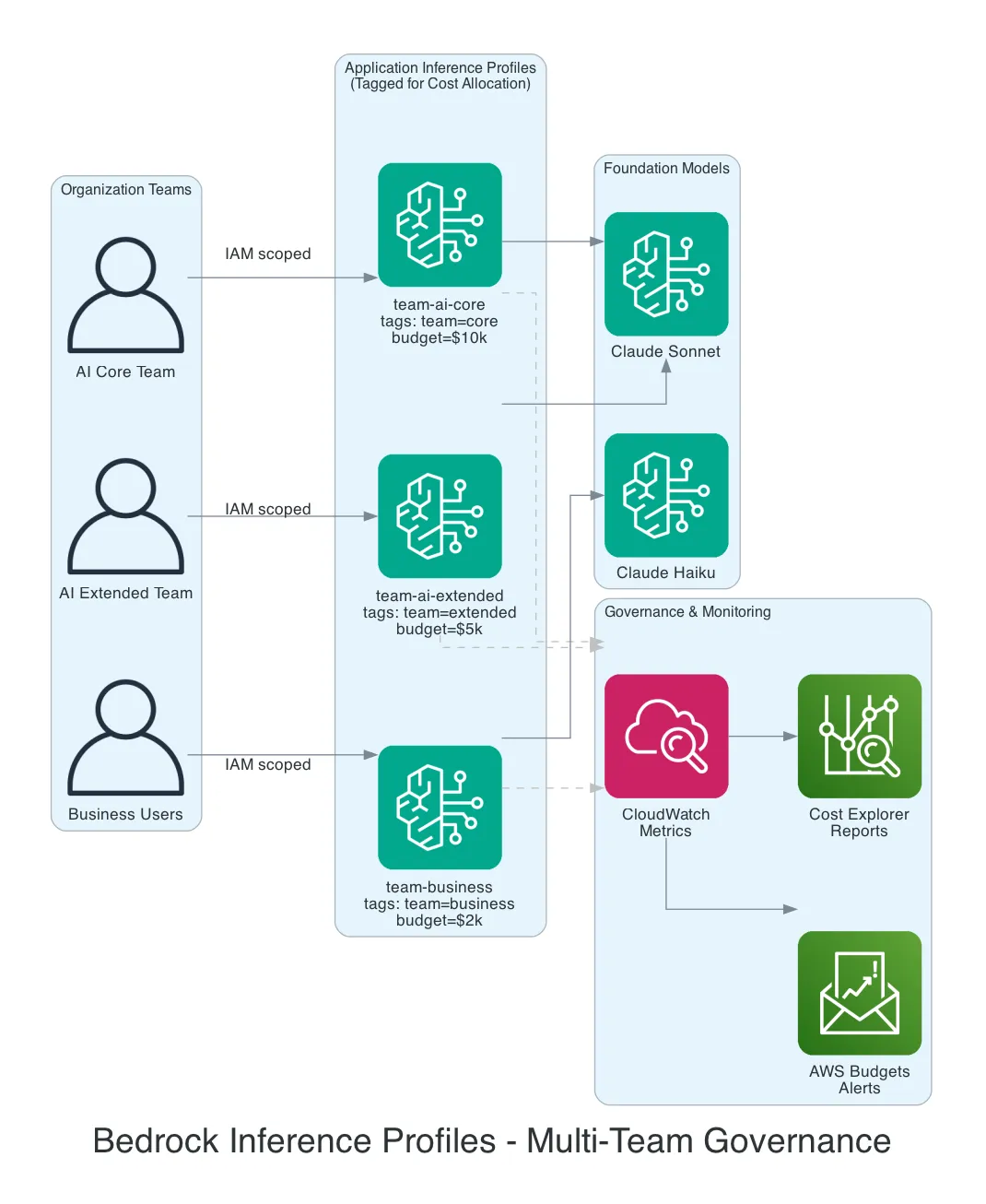
Amazon Bedrock Application Inference Profiles are the answer. Think of them as a thin wrapper around a foundation model. Instead of calling the model directly, each team calls through their own inference profile. Same model underneath — but now you have a control point.
How It Works
Each team gets their own Application Inference Profile, tagged with cost allocation metadata:
Team: AI Core       → Inference Profile "team-ai-core"       → Claude Sonnet
                      tags: team=core, budget=10000

Team: AI Extended   → Inference Profile "team-ai-extended"   → Claude Sonnet
                      tags: team=extended, budget=5000

Team: Business      → Inference Profile "team-business"      → Claude Haiku
                      tags: team=business, budget=2000
The model behavior is identical. What changes is visibility and control.
What This Gives You
| Governance Need | How Inference Profiles Help |
|---|---|
| Cost tracking | Tag profiles per team/app → costs visible in Cost Explorer and CUR |
| Cost allocation | Chargeback to business units based on actual usage per profile |
| Budget alerts | AWS Budgets per tag → alerts when a team overspends |
| Anomaly detection | AWS Cost Anomaly Detection catches unexpected spikes per profile |
| Access control | IAM policies restrict who can use which inference profile |
| Usage monitoring | CloudWatch metrics per profile → dashboards for tokens, requests, latency |
Step 1: Create Inference Profiles with Tags
Create an Application Inference Profile for each team using the AWS CLI or SDK:
import boto3

bedrock = boto3.client('bedrock')

response = bedrock.create_inference_profile(
    inferenceProfileName='team-ai-core',
    modelSource={
        'copyFrom': 'arn:aws:bedrock:eu-west-1::foundation-model/anthropic.claude-3-5-sonnet-20241022-v2:0'
    },
    tags=[
        {'key': 'team', 'value': 'ai-core'},
        {'key': 'environment', 'value': 'prod'},
        {'key': 'cost-center', 'value': 'AI-001'},
        {'key': 'monthly-budget', 'value': '10000'}
    ]
)
Activate these tags as Cost Allocation Tags in your billing console so they appear in Cost Explorer and the Cost and Usage Report (CUR).
Step 2: Lock Down Access with IAM
Use IAM policies to ensure each team can only invoke their own inference profile:
{
  "Version": "2012-10-17",
  "Statement": [
    {
      "Effect": "Allow",
      "Action": [
        "bedrock:InvokeModel",
        "bedrock:InvokeModelWithResponseStream"
      ],
      "Resource": "arn:aws:bedrock:eu-west-1:123456789012:inference-profile/team-ai-core"
    }
  ]
}
The AI Core team can only invoke through their profile. They can’t use other models or access other teams’ profiles. This is your access control layer.
Step 3: Set Up Alerting (Native — No Code Required)
With tagged inference profiles, you get native cost alerting:
AWS Budgets:
- Create a budget filtered by tag
team=ai-core - Set monthly threshold: $10,000
- Configure alerts at 50%, 80%, and 100%
- Notifications via email or SNS
AWS Cost Anomaly Detection:
- Monitors spending patterns per cost allocation tag
- Automatically detects unusual spikes
- No threshold configuration needed — it learns normal patterns
CloudWatch Alarms:
- Alert on token usage, request count, or invocation metrics per profile
- Useful for operational monitoring beyond just cost
These three give you visibility and warnings. But they don’t stop the spending.
Step 4: Proactive Hard Caps (The Missing Piece)
Here’s the reality: Bedrock doesn’t have a native “monthly spend cap per inference profile” toggle. AWS Budgets can trigger account-wide actions, but not per-profile granular blocking.
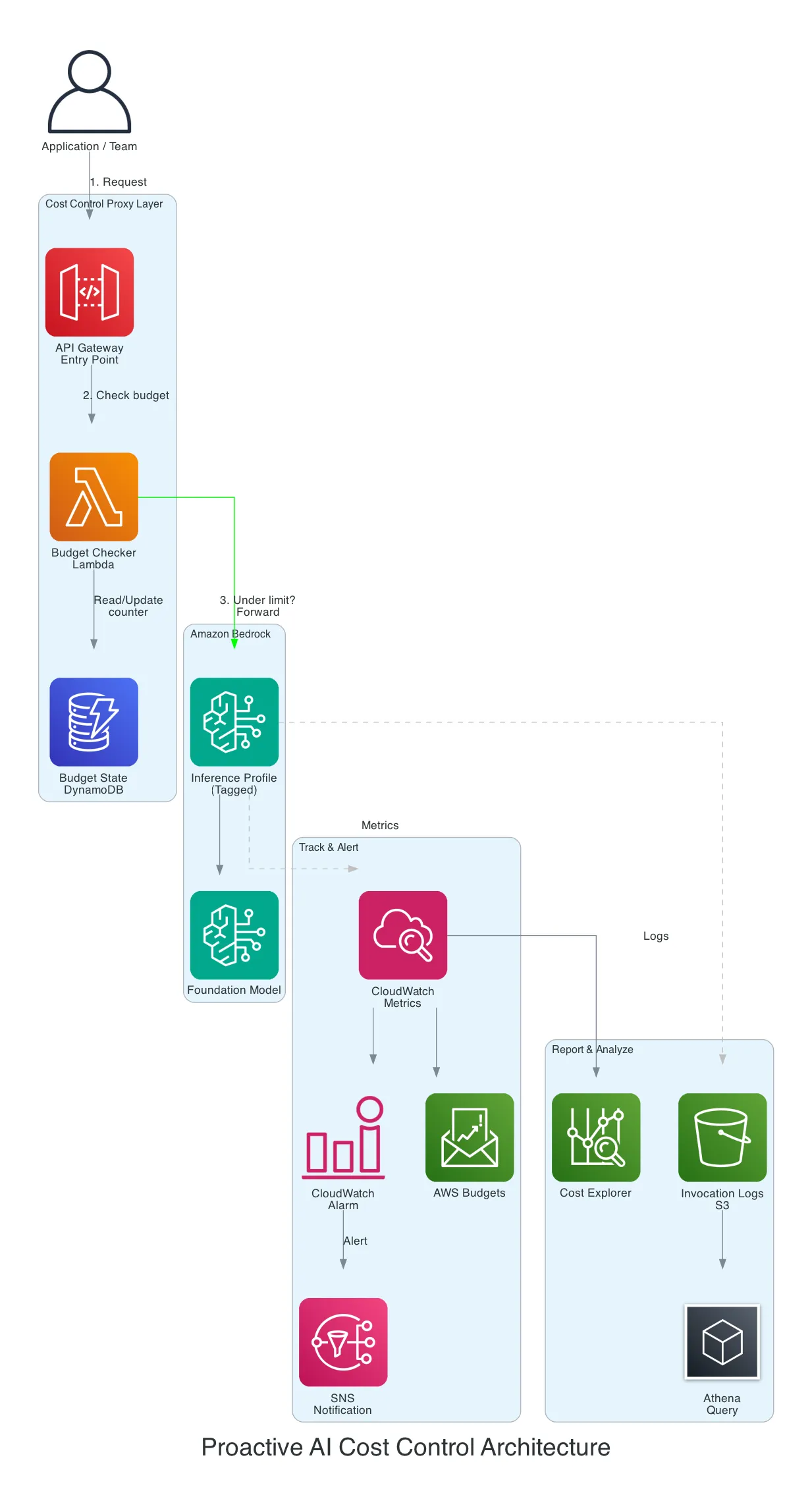
To actually block requests when a team exceeds their budget, you need a thin proxy layer:
The Pattern
- Application sends request to API Gateway (not directly to Bedrock)
- Lambda checks the team’s running total in DynamoDB
- Under budget? Forward the request to Bedrock via the inference profile
- Over budget? Return an error: “Monthly budget exceeded for team X”
- After response, update the DynamoDB counter with tokens consumed
Key Components
| Layer | AWS Service | Purpose |
|---|---|---|
| Entry point | API Gateway | Routes requests, adds team context |
| Budget check | Lambda | Reads counter, decides allow/block |
| State | DynamoDB | Stores running monthly totals per profile |
| Inference | Bedrock Inference Profile | Tagged model invocation |
| Metrics | CloudWatch | Per-profile usage metrics |
| Alerts | CloudWatch Alarms + SNS | Threshold notifications |
| Reporting | S3 + Athena + Cost Explorer | Detailed usage analytics |
AWS published a reference architecture for this exact pattern: Proactive AI Cost Management System for Amazon Bedrock.
Graduated Response
Rather than a hard block, consider a graduated approach:
| Threshold | Action |
|---|---|
| 50% of budget | Notification to team lead |
| 80% of budget | Warning + degrade to cheaper model (e.g., Haiku instead of Sonnet) |
| 100% of budget | Hard block — requests rejected with budget exceeded message |
| Emergency override | Admin can temporarily raise the limit via DynamoDB update |
Step 5: Observability with Model Invocation Logging
Enable Bedrock model invocation logging for full audit trails:
- S3: Gzipped JSON logs — query with Athena for historical analysis
- CloudWatch Logs: Real-time streaming — use Logs Insights for live queries
-- Athena: Monthly cost breakdown per team
SELECT
  tag_team,
  model_id,
  COUNT(*) as invocations,
  SUM(input_tokens) as total_input_tokens,
  SUM(output_tokens) as total_output_tokens
FROM bedrock_invocation_logs
WHERE month = '2026-02'
GROUP BY tag_team, model_id
ORDER BY total_input_tokens DESC
Feed this into QuickSight for management dashboards showing cost per team, cost per model, and token consumption trends.
Practical Recommendations
Start simple, iterate:
- Week 1: Create inference profiles with tags per team. Activate cost allocation tags.
- Week 2: Set up AWS Budgets with SNS alerts at 80% and 100%.
- Week 3: Enable model invocation logging to S3. Build an Athena query for monthly reports.
- Month 2: If hard caps are needed, implement the Lambda proxy pattern.
Pricing note: Inference profile costs are calculated based on the calling region, not the destination region. This makes budgeting predictable even with cross-region profiles.
Cross-region profiles: System-defined profiles distribute requests across regions for throughput and resilience. If your teams operate across EU regions, these provide automatic failover at no extra cost.
What I Learned
- Inference profiles are free — they’re a metadata layer, not a compute layer. There’s no cost to creating them.
- The gap is the hard cap — AWS gives you excellent visibility and alerting natively, but stopping requests at a per-profile level requires custom code.
- Tags are the foundation — if you don’t tag your inference profiles from day one, retroactive cost allocation is painful.
- Start with alerts, not blocks — most teams self-correct once they have visibility. Hard caps are for compliance requirements, not everyday governance.
Do It Yourself
Key Takeaways
- Inference profiles are the governance layer — they’re free metadata wrappers that give you cost tracking, access control, and usage monitoring per team without changing model behavior.
- Alerting comes free, hard caps require work — AWS Budgets and Cost Anomaly Detection provide excellent visibility out of the box, but blocking requests at a budget threshold requires a Lambda proxy pattern.
- Tag from day one — activate cost allocation tags immediately. Retroactive cost allocation across hundreds of API calls is painful without upfront tagging.
Try It Now
- Create your first inference profile — use the AWS CLI or SDK to wrap a foundation model with tags for your team. Code example: Bedrock CreateInferenceProfile API
- Activate cost allocation tags — go to AWS Billing Console → Cost Allocation Tags → activate your custom tags (e.g.,
team,cost-center). This enables filtering in Cost Explorer. - Set up AWS Budgets per team — create a budget filtered by
team=ai-coretag, set a monthly threshold, and configure SNS alerts at 80% and 100%. AWS Budgets setup guide - Enable model invocation logging — configure Bedrock to log all API calls to S3. Query with Athena for detailed usage reports. Bedrock logging documentation
- Build the proactive cost control pattern (optional) — if you need hard caps, deploy the Lambda proxy architecture. Full reference implementation: AWS Blog: Proactive AI Cost Management
Have questions about AI cost governance on AWS? Get in touch or explore more posts on the blog.
ABOUT THE AUTHOR
ONE LETTER A MONTH · NO TRACKER · UNSUBSCRIBE ANYTIME
CONTINUE READING
Related dispatches
OpenClaw vs NanoBot vs PicoClaw vs TinyClaw: Four Approaches to Self-Hosted AI Assistants
19 MIN READ
Fine-Tuning Mistral with Transformers and Serving with vLLM on AWS
11 MIN READ
Boulder — An AI Build Factory on AWS That Generates, Deploys, and Maintains Apps on Its Own
8 MIN READ
Comments
Sign in to leave a comment